Testing Doggy Smart for a Creative Portfolio Website
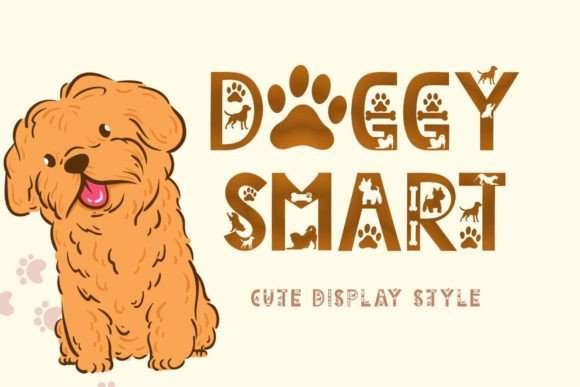
I was working on a redesign for a creative portfolio site the other day, and I needed a display font that felt playful but still professional. That’s when I came across Doggy Smart. It immediately stood out with its cute, unique design—each letter decorated with adorable dog illustrations. It wasn’t just a font; it was a visual character.
The first thing I noticed about Doggy Smart is how it balances whimsy with clarity. The uppercase letters are bold and expressive, while the lowercase letters maintain a friendly, approachable feel. This makes it perfect for headings and titles where you want to grab attention without losing readability.
Using Doggy Smart in a Hero Section
I decided to test it in the hero section of the portfolio site. The main headline read “Welcome to My Creative World,” and I wanted something that would stand out against a vibrant background image. Doggy Smart added just the right amount of charm. The dog accents didn’t distract from the message—they enhanced it.
On mobile, the font scaled well, maintaining legibility even at smaller sizes. I made sure to add enough spacing between characters to prevent them from feeling cramped. It’s easy to forget that display fonts can sometimes look cluttered on smaller screens, but Doggy Smart handled it gracefully.
Pairing Doggy Smart with Other Fonts
For body text, I paired Doggy Smart with a clean sans serif font like Open Sans. This combination worked well because the decorative display font drew the eye to important sections, while the simpler body font ensured that the content remained easy to read. It’s always a good practice to use a display font for headlines and a more readable font for body copy.
Another idea was to use Doggy Smart for subheadings or callout boxes. For example, a section titled “Recent Projects” looked great with the font, and the dog illustrations helped break up the page visually. It gave the design a cohesive yet fun aesthetic.
Considering Readability and Brand Identity
Readability is key, especially when designing for online brands. Doggy Smart isn’t meant for long paragraphs or dense blocks of text. Instead, it shines in short phrases, headlines, and decorative elements. When used appropriately, it adds personality to a brand without compromising usability.
For a boutique online store or a coaching website, Doggy Smart could be an excellent choice for banners, promotional headlines, or social media graphics. It brings a sense of warmth and approachability, which is perfect for businesses targeting younger audiences or those in the lifestyle, pet care, or creative industries.
One thing I checked before using it was whether the font supported multilingual characters. Since it does, it’s versatile enough for international projects or websites that cater to diverse audiences. This is a big plus for any digital product creator looking for a font that can adapt to different needs.
Responsive Design Considerations
When building a responsive layout, I tested Doggy Smart across various screen sizes. On desktops, the font looked lively and engaging. On tablets and phones, I adjusted the line height and font size slightly to ensure that the text remained legible and didn’t overlap with other elements. It’s important to remember that display fonts can behave differently on smaller screens, so testing is essential.
I also considered the contrast between the font and the background. If the background was dark, I made sure the font color was light enough to stand out. Conversely, if the background was light, I used a darker shade for the text. These small adjustments helped maintain a polished look across all devices.
Real-World Applications of Doggy Smart
Doggy Smart can be used in a variety of digital contexts. For a product landing page, it could serve as the main title above a feature image. In a blog redesign, it might appear in post headers or category tags. For a course sales page, it could highlight the course name or a special offer.
In a digital brand kit, this font could become part of the brand’s identity, especially if the brand has a playful or youthful tone. It’s also a great option for campaign landing pages, where a catchy headline can make all the difference in capturing user attention.
What I appreciated most about Doggy Smart is that it feels intentional. It doesn’t scream for attention in a way that distracts from the message. Instead, it adds a subtle layer of personality that makes the design feel more human and relatable.
Overall, Doggy Smart is a versatile display font that works well in both creative and commercial settings. Whether you're designing a personal portfolio, a boutique online store, or a marketing campaign, this font offers a fresh take on typography that aligns with modern design trends.